Quote list page upgrade
Minor Upgrade
With this release, the Quote list page is being upgraded from its legacy IPA-based design to a modern Micro UI built on the Mantine framework. This update standardizes the discovery process and improves the user experience while maintaining full backward compatibility.
Key highlights:
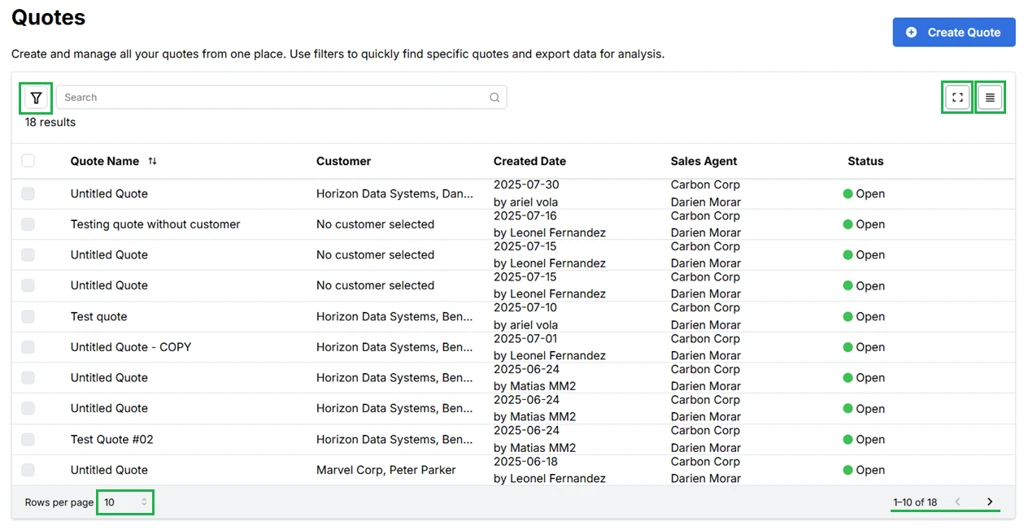
Users can manage and customize their data view using the following dashboard features:
- Filter the quote list by Status and Date Range, making it easier to manage high volumes of data.
- Increase or decrease the number of rows displayed using the row count selector. The options available are 5 rows, 10 rows, and 20 rows per page.
- New density icon allows you to toggle the table layout instantly between three views:
- Spaced: Maximum legibility and breathing room.
- Normal: The standard balanced view.
- Compact: High-density view to see more data on screen at once.
- Tables now clearly display key attributes including Quote Name, Customer, Created Date, Sales Agent, and Quote Status.
- Click Quote Name to sort data in ascending or descending order.
- Click on the full-screen icon to expand the workspace and focus entirely on your quote management.
- Select checkbox(es) to delete quotes in bulk.
Feature enablement
This feature is not enabled by default. Contact your AppDirect technical representative to request it.
Setting enablement
No setting enablement is required.
Documentation
Documentation will be updated with the release.
Was this page helpful?
Tell us more…
Help us improve our content. Responses are anonymous.
Thanks
We appreciate your feedback!